

Pick faster. Fulfill smarter.
Grocery picking software that brings structure, speed, and consistency to in-store fulfillment. Real-time workflows guide every step, from order release to final handoff.
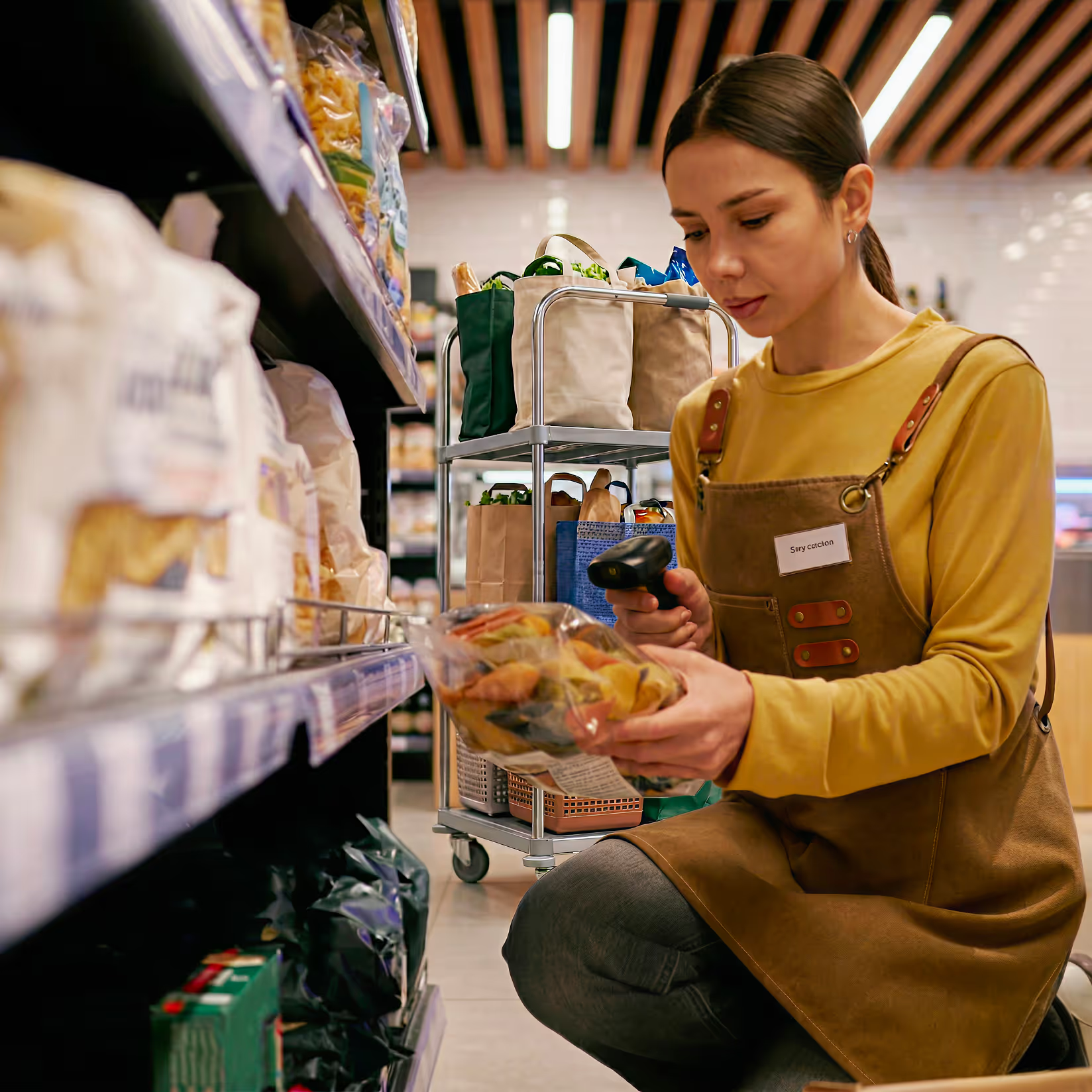
Every grocery order picked costs more than you think.
The gap between how most grocers pick today and what's actually possible is measured in dollars — per order, per shift, per store. OrderGrid grocery picking software closes it.
Reduce picking costs up to
The saving that compounds across every shift, every store
Raise picker productivity by up to
Faster picks, more orders, same headcount
Picking accuracy above
Fewer errors, trusted orders, satisfied customers
Reclaim lost labor time per store
Redirected from inefficiency to fulfillment and service
Increase grocery picking throughput
Reduce unnecessary movement and get more orders completed in less time — without adding store headcount.
Guide and execute grocery order picking in one workflow
Give pickers everything they need, exactly when they need it — reducing rework and keeping labor focused on fulfillment.
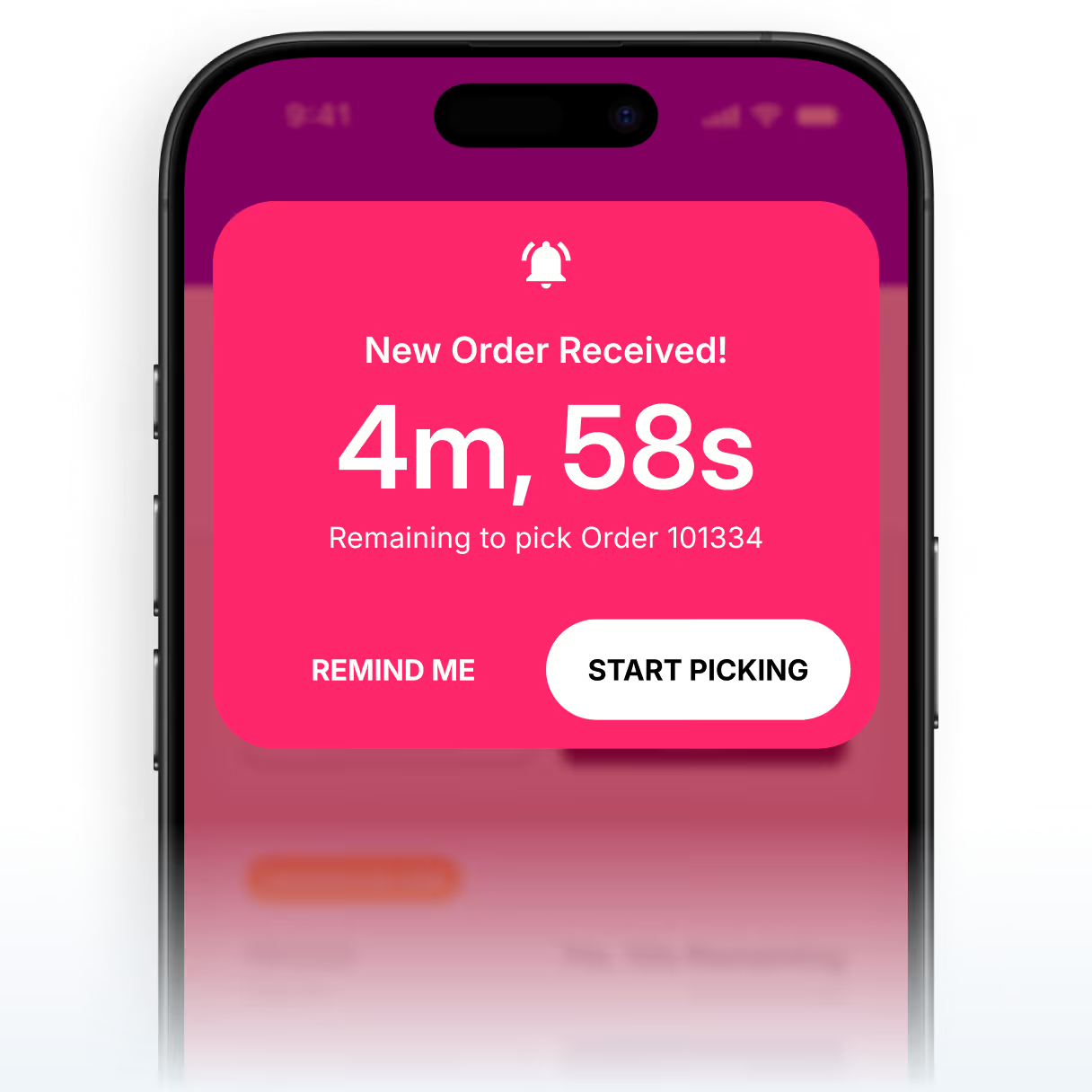
Prioritize and assign work in real-time
Keep teams focused on the most urgent and relevant grocery orders — minimizing idle time and improving labor utilization.
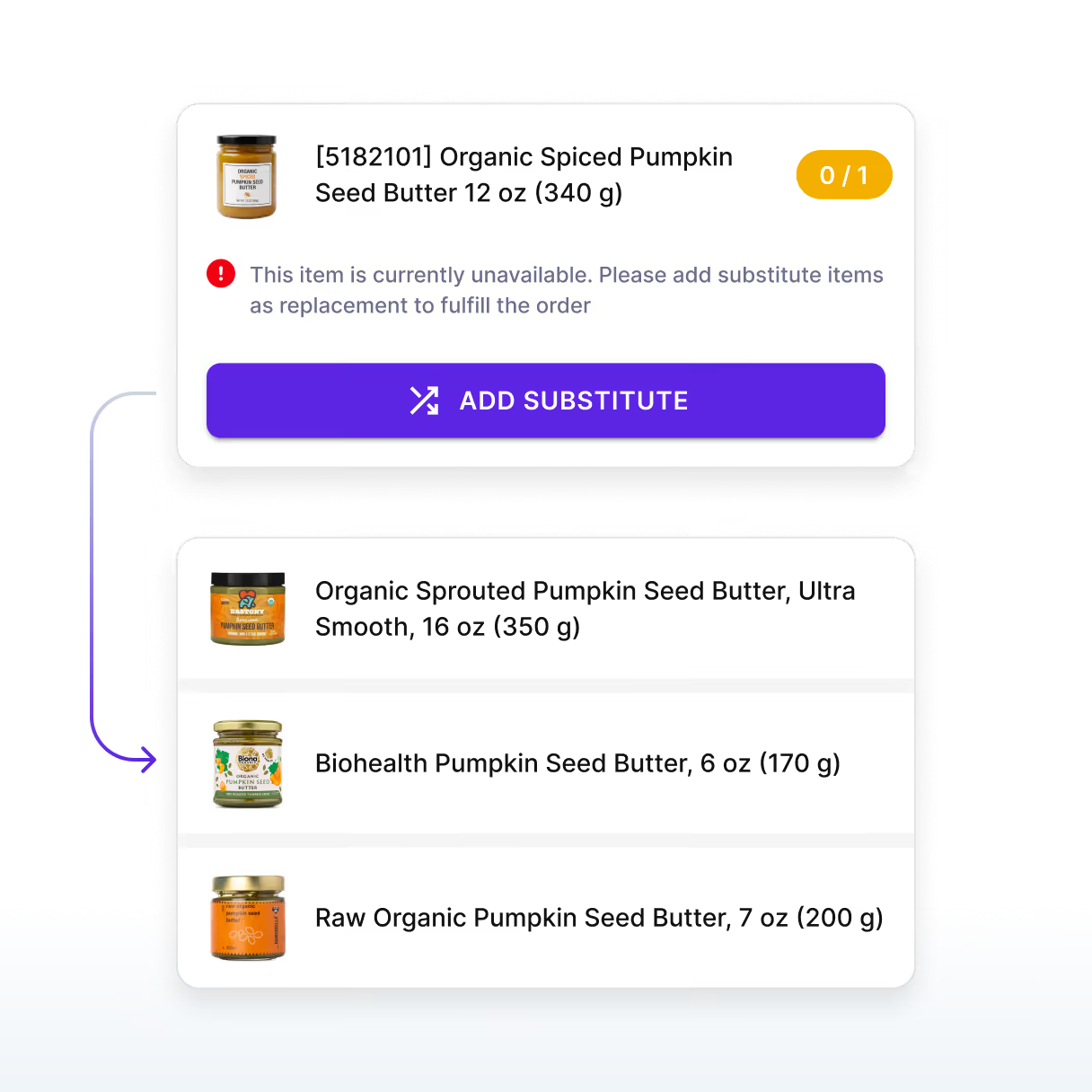
Prevent delays from out-of-stocks and substitutions
Guide grocery substitution workflows and exception handling in real time so fulfillment stays on track when items are out-of- stock.
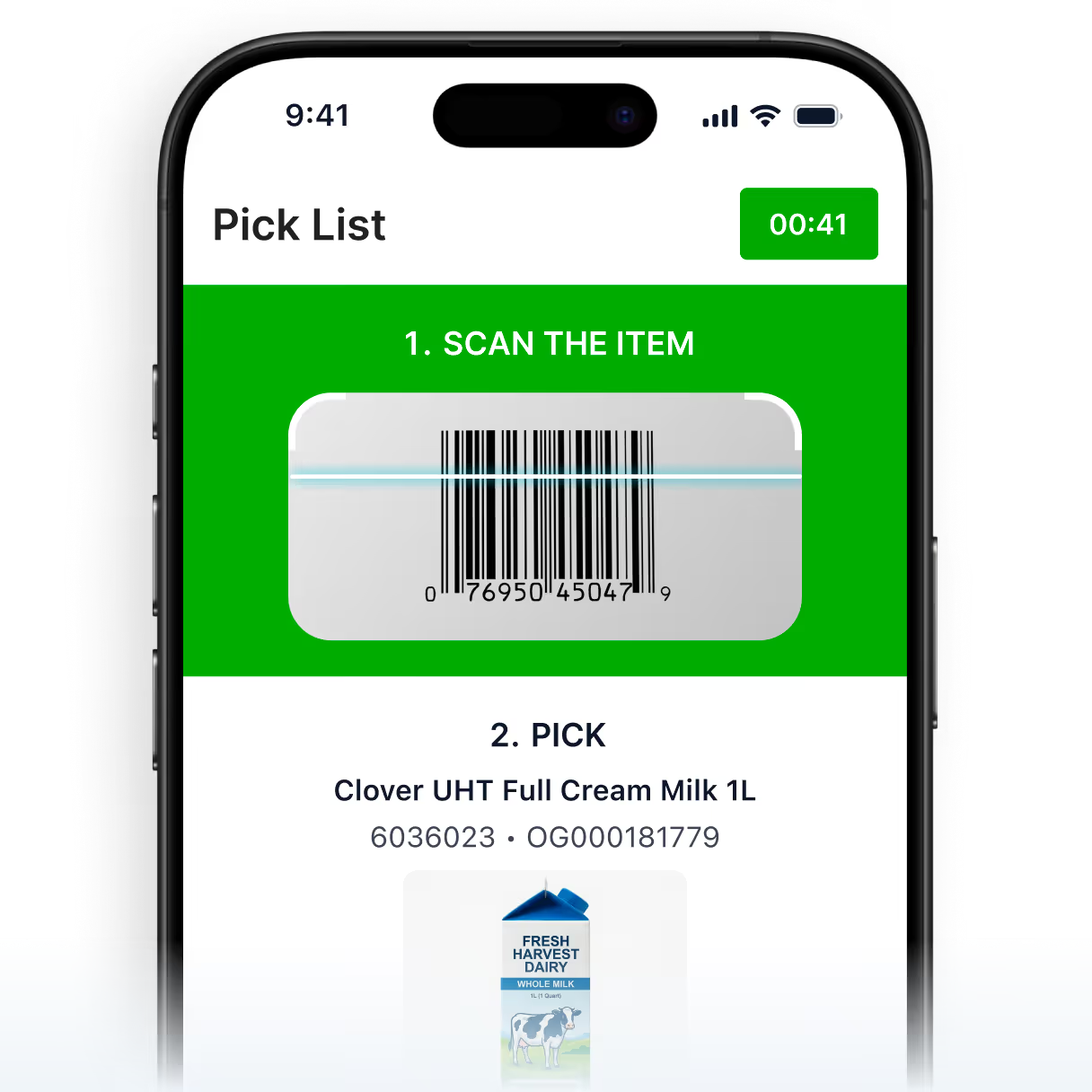
Deliver every grocery pick with precision
Confirm the right items, quantities, and order details at each step before the order is completed.
Every tool your grocery picking teams need, in one platform


Scheduled order picking
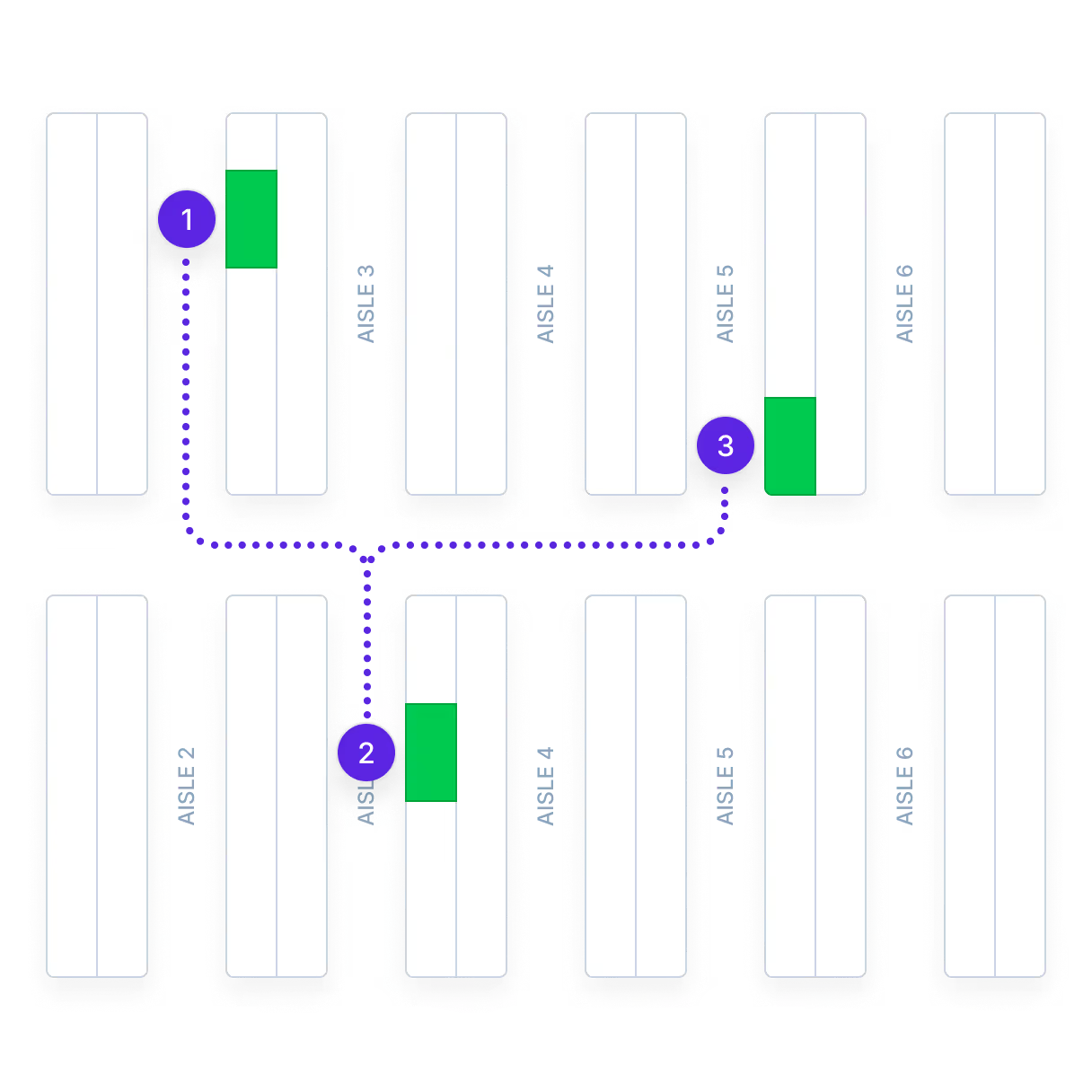
Orders sequenced, grouped, and optimized for the most efficient walk path through the store.


On-demand picking
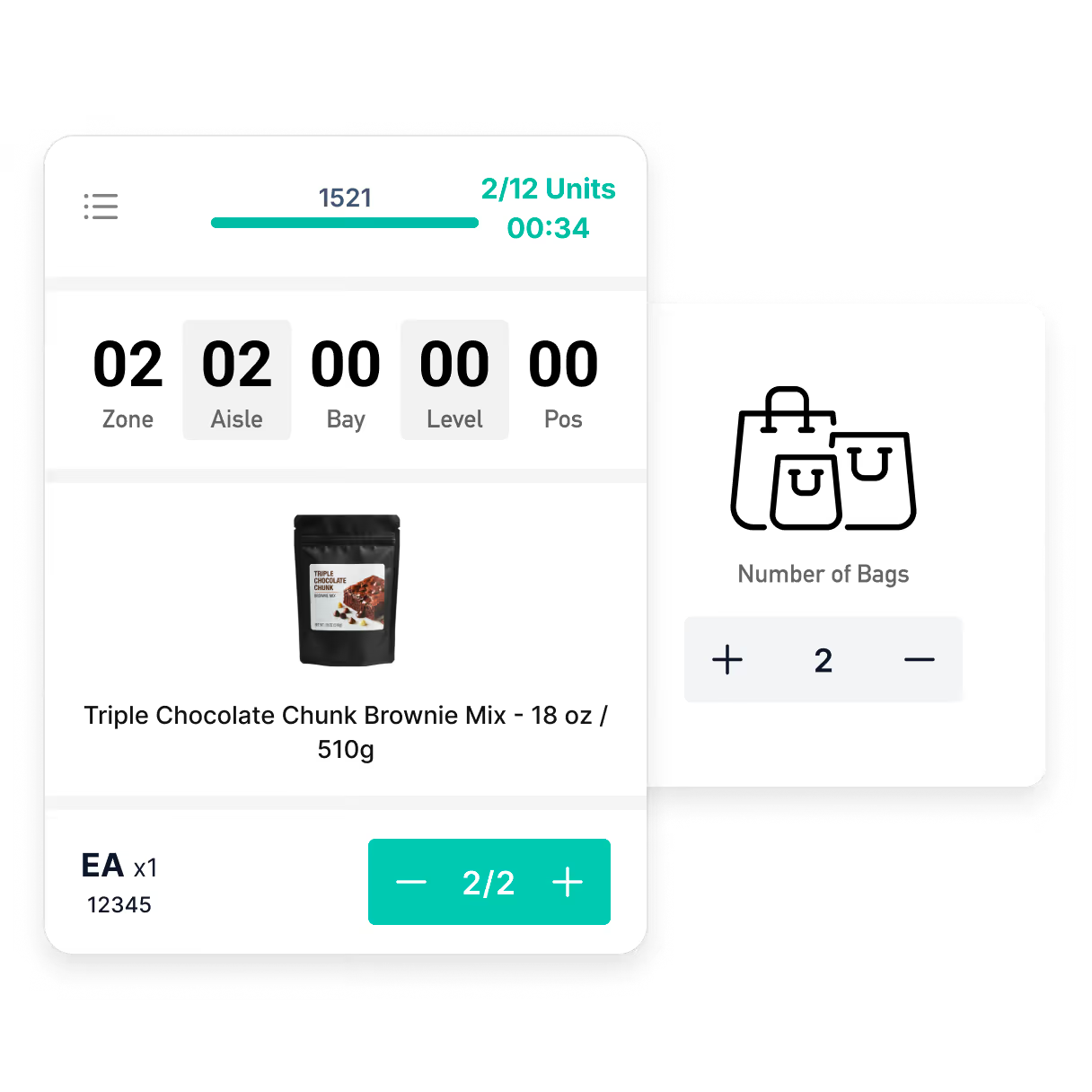
One-click order start with timer-based tracking — supporting standard, weighted, and controlled item types.


Multi-order cart picking
Pick multiple orders simultaneously using compartmentalized carts with clear indicators and optimized routing.


Pick path optimization
Zone-based routing by department, aisle, or location—with real-time updates as store conditions change.


Scan-to-validate execution
Scan logic adapts by item type with visual validation to confirm accuracy at every pick.
%201.svg)
%201-1.svg)
Substitution management
Shopper preferences, store policies, and approved substitutions presented at the point of exception.


Out-of-stock detect and flag
Unavailable items trigger structured exception flows—keeping orders moving and decisions consistent.


Staging and handoff
Lane-based staging by temperature zone and order type, with one-click handoff for complete delivery visibility.


Picker productivity tracking
Real-time workload visibility by picker — accepted orders, completion rates, and gap identification.


Fulfillment control tower dashboard
Live order status across all active pickers, with at-risk order identification and exception alerts in one view.


AI-powered insights
Natural language querying across all picking data — performance reports, error rates and OOS trends on demand.


Role-based access controls
Permissions by role and site — admin, manager, associate — with SSO, 2FA, and tailored UI per user type.
Frequently asked questions
Still have questions?
Email — info@ordergrid.com
Ecommerce pick and pack is the fulfillment workflow that connects an online order to the physical act of selecting, packing, and preparing items for delivery or pickup. In grocery, this workflow runs inside existing retail stores rather than dedicated warehouses, which means pickers share aisles with shoppers and inventory changes continuously.
Product availability must be confirmed in real time against live shelf and backroom positions because the speed and accuracy of ecommerce pick and pack directly determines whether a grocer can offer competitive delivery windows. In store fulfillment adds complexity that warehouse-based operations avoid: fluctuating stock levels from walk-in purchases, aisle congestion during peak hours, and the need to coordinate picking with shelf replenishment schedules.
OrderGrid runs ecommerce pick and pack as part of an integrated in store fulfillment system, with real-time inventory feeds confirming availability at order time and pick workflows optimized for each store's layout.
Batch picking groups items from multiple orders into a single pick run, reducing the number of trips through the store. Zone picking assigns each picker to a fixed section of the store, and orders are split across zones then consolidated. The two methods solve different problems and are often combined.
Batch picking is strongest when many orders share common items, because the picker retrieves each product once for several orders. Zone picking is strongest in large stores with high SKU counts, because pickers develop speed and familiarity within their assigned area. Many operations use batch picking within zones, where each zone picker handles multiple orders simultaneously, combining the travel reduction of batching with the specialization gains of zoning.
OrderGrid lets grocery operations configure batch, zone, or hybrid picking strategies from one platform and switch between them based on order volume and staffing levels.
Zone picking divides a store or warehouse into defined sections and assigns each picker to a specific zone. When an order contains items from multiple zones, each zone picker selects their portion and passes the partial order to the next zone or to a consolidation point. This method reduces congestion and shortens travel distances within each zone.
Zone picking works well for large-format stores with high SKU counts because pickers build familiarity with their section's layout and stock positions, increasing speed over time. The tradeoff is coordination: orders must be consolidated accurately across zones before packing. Systems that lack automated consolidation tracking risk mismatched or incomplete orders at the packing station, especially during high-volume periods.
OrderGrid supports zone picking with automated order splitting across store zones and consolidation tracking that confirms near-perfect accuracy before packing.
Pick, pack, and ship describes the three-stage fulfillment workflow used to process customer orders. Picking is selecting the correct items from inventory. Packing is grouping those items into the right container with appropriate protection and temperature handling. Shipping is dispatching the packed order for delivery or staging it for customer collection.
Each stage depends on the one before it: picking errors cascade into packing mistakes, and packing delays push back dispatch times. Effective pick pack and ship operations log every handoff between stages so that errors can be traced to their source. In grocery, the workflow adds complexity because perishable items have strict time limits between pick and dispatch, and temperature-controlled staging is required between packing and shipping.
OrderGrid manages all three stages within one platform, coordinating pick lists, packing validation, and dispatch tracking so each handoff is logged without manual re-entry.
Start with the pick path. Poorly sequenced pick routes account for the largest share of wasted picker time. Software-optimized paths that follow the store layout cut travel distance and speed up each pick run. Real-time inventory positions prevent pickers from walking to empty slots. Scan verification catches errors before packing.
Beyond pick path optimization, batch or zone picking during peak periods spreads volume across pickers efficiently. Tracking picking speed and accuracy at the individual picker level identifies training gaps. In-store ecommerce picking often costs more than the fulfillment P&L reflects because labor is shared with floor operations, making per-order cost attribution essential for true margin visibility.
OrderGrid combines optimized pick routing with live inventory positions and scan-based verification, helping grocers achieve accuracy rates above 99% while reducing pick time per order.
Pick and pack software automates the coordination of order selection, packing, and dispatch for retail and grocery fulfillment operations. It replaces paper-based pick lists with digital workflows that guide pickers through optimized routes, validate items at scan, and track packing progress through to handoff. This category of picking software ranges from standalone modules to integrated platforms.
More advanced systems connect picking with order management, inventory counts, and delivery scheduling so the entire fulfillment process runs from one interface. Key differentiators include support for multi-temperature packing rules, real-time inventory synchronization, and configurable substitution handling. Operations that use disconnected tools for picking and order management typically experience data lag that increases error rates and slows throughput.
OrderGrid provides pick and pack software as part of a single grocery operations platform, with picking, packing, order management, and dispatch connected natively. Deployment typically completes within 90 days.
Batch picking is an order fulfillment method where a picker collects items for multiple orders in a single trip through the store or warehouse. Instead of completing one order at a time, the picker gathers all instances of the same product across several orders, then sorts items into individual orders at a packing station.
Batch picking reduces total travel distance and delivers significant productivity gains compared to single-order picking, especially in operations with high order volumes and overlapping product requests. The method works best when order profiles share common SKUs. Effective batch formation algorithms consider product location proximity, order deadlines, and temperature compatibility to build batches that minimize both travel and sort time at the consolidation point.
OrderGrid automatically groups orders by product overlap and pick zone proximity, reducing travel time and increasing the number of orders completed per shift through batch picking workflows.
Pick and pack in grocery fulfillment is the process of selecting ordered items from store shelves or backroom stock and packaging them for delivery or customer pickup. Grocery pick and pack is more complex than general retail because pickers handle perishable products with expiry dates, items requiring different temperature zones, and substitutions when a product is unavailable.
Speed and accuracy directly affect both customer satisfaction and fulfillment cost. Packing logic must account for weight distribution, bag limits, and temperature separation so that frozen goods do not sit alongside ambient items. Substitution handling requires pre-set rules or real-time customer approval to avoid rejections at delivery. Operations that lack integrated substitution logic see higher return rates and lower order acceptance.
OrderGrid handles grocery pick and pack with expiry-aware item selection, multi-temperature packing logic, and configurable substitution rules, reducing picking costs and order errors.
Order picking is the process of selecting items from storage locations to fulfill a customer order. A picker receives a list of items, travels to each location, retrieves the correct product and quantity, and stages the completed order for packing or dispatch. Order picking methods include single-order picking, batch picking, and zone picking.
Single-order picking handles one order per trip and suits low-volume operations. Batch picking groups multiple orders into one trip to reduce travel distance. Zone picking assigns pickers to specific store sections, with partial orders consolidated afterward. The right method depends on store layout, order volume, staffing levels, and SKU density. Many operations combine methods during different dayparts to match demand patterns.
OrderGrid enables all major picking methods within one system, letting grocery operations choose or combine approaches without changing platforms as volume fluctuates.
Curbside pickup services let customers order online and collect groceries from a designated area outside the store. The retailer receives the order, picks items from store shelves, packs them by temperature category, and stages the bags for handoff when the customer arrives. This form of in store fulfillment depends on accurate live inventory data to confirm availability at order time.
The operational challenge is timing. Stores must balance pick scheduling against walk-in shopper traffic, manage staging space for multiple orders at different readiness states, and handle last-minute arrival notifications. Poorly timed picks result in either frozen items thawing in staging or customers waiting because their order is not ready. Scan-based verification at each stage catches substitution errors before the customer drives away.
OrderGrid powers curbside fulfillment by connecting real-time inventory levels to picking and staging workflows, so staff know exactly when each order is ready for handoff.
Order picking systems for grocery stores coordinate how items are selected, packed, and staged for delivery or customer pickup. The best systems handle challenges specific to grocery: perishable items with expiry windows, multi-temperature zones within the same store, and high SKU counts that make pick accuracy harder to maintain.
Solutions range from paper-based pick lists to digital platforms with mobile-guided routing that directs pickers through optimized sequences. Grocery-specific systems also manage substitution logic when a requested item is out of stock, applying customer preferences or store rules to select replacements without manual intervention. Multi-temperature coordination matters because frozen, chilled, and ambient items must be picked in an order that preserves cold chain integrity.
OrderGrid supports grocery order picking with mobile-guided workflows built for fresh, frozen, and ambient categories, including expiry-aware pick sequencing across stores in 8 countries.
In-store fulfillment is the process of picking, packing, and preparing customer orders for delivery or pickup using inventory stored inside a retail location rather than a dedicated warehouse. Staff select items directly from store shelves and backroom stock, pack them by temperature and order requirements, and stage completed orders for handoff.
This model allows grocery retailers to offer ecommerce services without building separate distribution infrastructure. The operational challenge is that in-store fulfillment shares space and inventory with walk-in shoppers, so stock levels change continuously and pickers must navigate customer traffic. Accuracy depends on real-time inventory positions rather than batch-updated counts. In-store fulfillment software coordinates pick routing, substitution handling, and staging logistics within these constraints.
OrderGrid provides in store fulfillment software that connects live inventory data to picking and staging workflows, enabling grocery retailers to fulfill online orders from existing store locations with accuracy rates above 99%.
Reduce the cost of every grocery order you fulfill
Ready to close the picking profit gap? See how OrderGrid's in-store grocery fulfillment software helps operators pick faster, fulfill smarter, and drive down the cost of every order — across every store.